
How to run a coding agent in a sandbox with OpenHands
Code generation — give an agent a plain-English brief and it plans, writes a Python project, runs the tests, and shows the output. All inside a Docker container.
Hosted on our YouTube channel Watch on YouTube ↗
Build a small, dependency-free Python gradebook application in this empty workspace.

Requirements:
1. Create gradebook.py with a Student dataclass and a Gradebook class.
2. Gradebook must add students, reject duplicate IDs, record scores from 0 through 100, and compute each student's average.
3. Add a command-line demo under `if __name__ == "__main__"` that prints a readable summary for at least two students.
4. Create tests/test_gradebook.py using only unittest. Include tests for the normal path, duplicate IDs, invalid scores, and averages.
5. Create a short README.md with run and test commands.
6. Run the complete test suite and the command-line demo. Fix any failures.

Before editing, give me a short plan. At the end, summarize the files created and quote the final test result. Do not install third-party packages and do not modify anything outside this workspace.
Run it: bash run.sh
#!/usr/bin/env bash
set -euo pipefail

IMAGE="${CANVAS_IMAGE:-ghcr.io/openhands/agent-canvas:latest}"
PORT="${PORT:-8000}"
NAME="agent-canvas-class-demo"
SCRIPT_DIR="$(cd -- "$(dirname -- "${BASH_SOURCE[0]}")" && pwd)"
STATE_DIR="$SCRIPT_DIR/state"
WORKSPACE_DIR="$SCRIPT_DIR/workspace"

fail() { printf '\nERROR: %s\n' "$*" >&2; exit 1; }

case "${1:-start}" in
  stop)
    docker stop "$NAME" >/dev/null 2>&1 && echo "Agent Canvas stopped." || echo "Agent Canvas is not running."
    exit 0 ;;
  logs)
    exec docker logs -f "$NAME" ;;
  status)
    docker ps -a --filter "name=^/${NAME}$" --format 'table {{.Names}}\t{{.Status}}\t{{.Ports}}'
    exit 0 ;;
  start) ;;
  *) fail "Usage: ./run.sh [start|stop|logs|status]" ;;
esac

command -v docker >/dev/null 2>&1 || fail "Docker is not installed. See https://docs.docker.com/engine/install/"
docker info >/dev/null 2>&1 || fail "Docker is installed but unavailable. Start it with 'sudo systemctl start docker', or fix Docker group permissions."

mkdir -p "$STATE_DIR" "$WORKSPACE_DIR"

# The official image runs as uid/gid 10001. These bind mounts are created by
# the host user, so make only the two demo directories writable by that user.
# Without this, the frontend starts but agent-server exits with EACCES and the
# browser reports a misleading 502 for 127.0.0.1:18000.
chmod a+rwx "$STATE_DIR" "$WORKSPACE_DIR"

if docker ps --format '{{.Names}}' | grep -Fxq "$NAME"; then
  echo "Agent Canvas is already running at http://localhost:$PORT/canvas"
  exit 0
fi
docker rm -f "$NAME" >/dev/null 2>&1 || true

echo "==> Starting official Agent Canvas image: $IMAGE"
echo "==> Mounted workspace: $WORKSPACE_DIR -> /projects/agent-canvas-demo"
docker run -d --rm --pull=missing \
  --name "$NAME" \
  -p "$PORT:8000" \
  -v "$STATE_DIR:/home/openhands/.openhands" \
  -v "$WORKSPACE_DIR:/projects/agent-canvas-demo" \
  "$IMAGE" >/dev/null

probe() {
  # Check the proxied backend, not merely the static Canvas page.
  if command -v curl >/dev/null 2>&1; then curl -fsS "http://localhost:$PORT/alive" >/dev/null 2>&1
  elif command -v wget >/dev/null 2>&1; then wget -qO- "http://localhost:$PORT/alive" >/dev/null 2>&1
  else return 2
  fi
}

printf '==> Waiting for Agent Canvas '
ready=0
for _ in $(seq 1 120); do
  set +e; probe; rc=$?; set -e
  if [ "$rc" -eq 0 ]; then ready=1; break; fi
  if [ "$rc" -eq 2 ]; then sleep 15; ready=1; break; fi
  printf '.'; sleep 2
done
printf '\n'

if [ "$ready" -ne 1 ]; then
  docker logs --tail 80 "$NAME" >&2 || true
  fail "Canvas did not answer within four minutes. Run: ./run.sh logs"
fi

URL="http://localhost:$PORT/canvas"
echo "==> Agent Canvas is ready: $URL"
command -v xdg-open >/dev/null 2>&1 && xdg-open "$URL" >/dev/null 2>&1 || true
printf '\nSelect workspace: /projects/agent-canvas-demo\nStop: ./run.sh stop    Logs: ./run.sh logs\n'
"""A small, dependency-free gradebook application.

Provides a `Student` dataclass and a `Gradebook` class that can register
students, record their scores, and compute per-student averages.
"""

from __future__ import annotations

from dataclasses import dataclass, field

class DuplicateStudentError(Exception):
    """Raised when attempting to add a student ID that already exists."""

class StudentNotFoundError(Exception):
    """Raised when referencing a student ID that hasn't been added."""

class InvalidScoreError(Exception):
    """Raised when a score is outside the valid 0-100 range."""

@dataclass
class Student:
    student_id: str
    name: str
    scores: list = field(default_factory=list)

    def average(self) -> float:
        """Return the mean of recorded scores, or 0.0 if none exist."""
        if not self.scores:
            return 0.0
        return sum(self.scores) / len(self.scores)

class Gradebook:
    """Tracks students and their scores."""

    def __init__(self) -> None:
        self._students: dict[str, Student] = {}

    def add_student(self, student_id: str, name: str) -> Student:
        if student_id in self._students:
            raise DuplicateStudentError(
                f"Student with ID '{student_id}' already exists"
            )
        student = Student(student_id=student_id, name=name)
        self._students[student_id] = student
        return student

    def get_student(self, student_id: str) -> Student:
        try:
            return self._students[student_id]
        except KeyError:
            raise StudentNotFoundError(
                f"No student with ID '{student_id}'"
            ) from None

    def add_score(self, student_id: str, score: float) -> None:
        if not 0 <= score <= 100:
            raise InvalidScoreError(
                f"Score {score!r} is out of range; must be between 0 and 100"
            )
        student = self.get_student(student_id)
        student.scores.append(score)

    def average(self, student_id: str) -> float:
        return self.get_student(student_id).average()

    def all_students(self) -> list:
        return list(self._students.values())

def _demo() -> None:
    gradebook = Gradebook()
    gradebook.add_student("s1", "Alice Johnson")
    gradebook.add_student("s2", "Bob Smith")

    for score in (95, 88, 92):
        gradebook.add_score("s1", score)
    for score in (70, 65, 80, 75):
        gradebook.add_score("s2", score)

    print("Gradebook Summary")
    print("=" * 30)
    for student in gradebook.all_students():
        scores_str = ", ".join(str(s) for s in student.scores)
        print(f"{student.name} (ID: {student.student_id})")
        print(f"  Scores : {scores_str}")
        print(f"  Average: {student.average():.2f}")
        print("-" * 30)

if __name__ == "__main__":
    _demo()
# Demo 1 — OpenHands Agent Canvas
This is the **current OpenHands browser interface**, not the legacy OpenHands Local GUI in the parent folder. Agent Canvas combines a browser UI with an Agent Server and lets you switch models, workspaces, backends, and even ACP-compatible agents.
This tutorial uses the official Docker image so the agent sees only the mounted `workspace/` folder—not your whole Linux home directory.
## What this demo teaches
- The difference between the browser canvas, backend, workspace, agent, and model.
- How an agent plans, edits files, runs terminal commands, and reports evidence.
- How Docker creates a clearer trust boundary than running the backend directly on the host.
- How to inspect the agent's conversation, files, and terminal from one interface.
## Prerequisites
- Linux with Docker installed, usable without `sudo`, and running.
- About 5–10 GB free disk space for images and at least 4 GB free RAM.
- An API key for a supported model provider (or another model-access method supported by Agent Canvas).
- Internet access for the first image pull and model calls.
Verify Docker:
```bash
docker --version
docker info
```
## Start
From this folder:
```bash
chmod +x run.sh
./run.sh
```
Then open <http://localhost:8000/canvas>. The script normally opens it for you.
On first launch:
1. Select the local Docker backend if prompted.
2. Open **Settings → LLM** and add a provider, model, and API key.
3. Open the workspace `/projects/agent-canvas-demo`.
4. Start a new conversation and paste the prompt from [DEMO-PROMPT.md](DEMO-PROMPT.md).
Do not paste an API key into chat or show it in the recording. Enter it only in the settings secret field, preferably before recording.
## What to inspect during the demo
The task asks the agent to build and test a tiny Python project. While it works, point out:
- **Conversation:** the natural-language request, plan, progress, and final summary.
- **Terminal:** real commands and test output produced by the agent.
- **Files:** the created source, tests, and README.
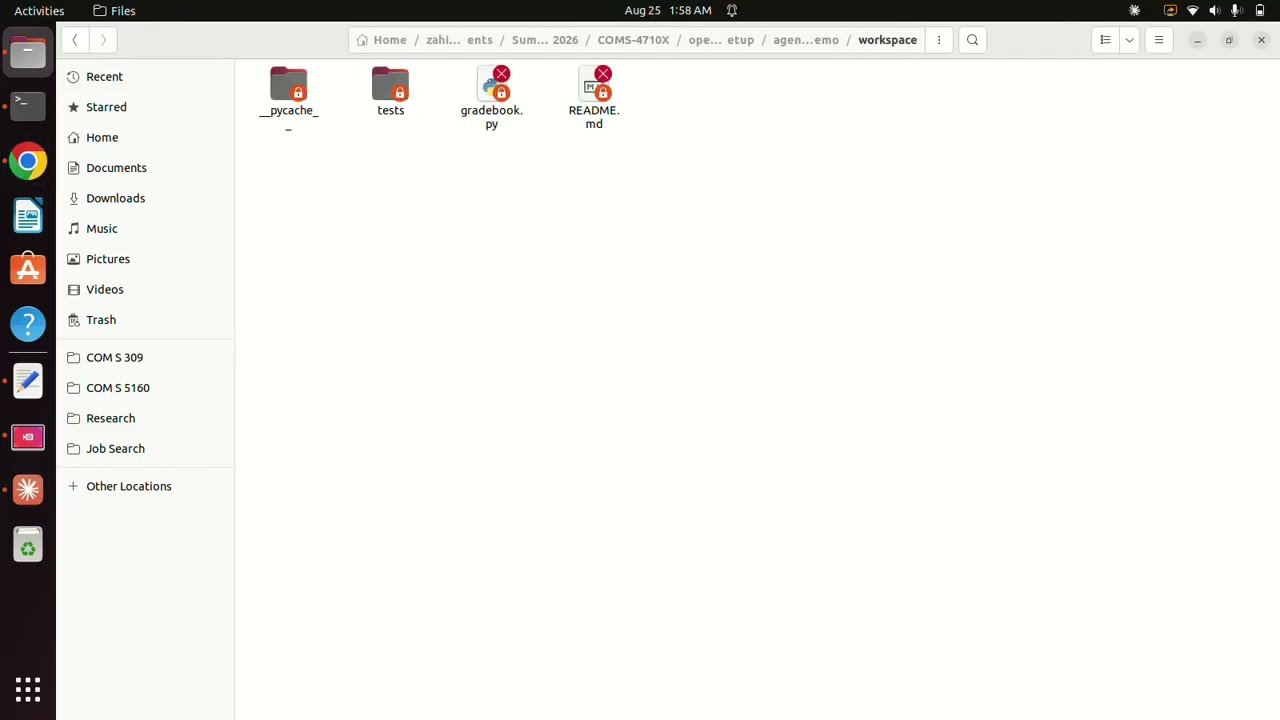
- **Workspace boundary:** all generated files appear in this folder's `workspace/` directory.
After completion, verify independently on the host:
```bash
find workspace -maxdepth 3 -type f -print
python3 -m unittest discover -s workspace/tests -v
python3 workspace/gradebook.py
```
## Useful commands
| Action | Command |
|---|---|
| Start | `./run.sh` |
| Stop | `./run.sh stop` |
| Status | `./run.sh status` |
| Logs | `./run.sh logs` |
| Use another host port | `PORT=8001 ./run.sh` |
Settings and conversations persist in `state/`. Student work persists in `workspace/`. The stop command does not delete either directory.
## Troubleshooting
| Symptom | Fix |
|---|---|
| Docker permission denied | Add your user to the `docker` group, then log out/in: `sudo usermod -aG docker $USER`. |
| Docker daemon unavailable | `sudo systemctl start docker`. |
| Port 8000 is occupied | `PORT=8001 ./run.sh`, then open `http://localhost:8001/canvas`. |
| Canvas loads at `/` but not `/canvas` | Open the exact `/canvas` URL printed by the script. |
| Model request fails | Recheck provider, model name, key, credits, and base URL in **Settings → LLM**. |
| Files do not appear | Confirm the selected workspace is `/projects/agent-canvas-demo`. |
| First launch is slow | Let the official image finish downloading before recording. |
## Safety and cleanup
The agent can execute arbitrary commands inside its container and can change anything under the mounted `workspace/` directory. Do not put secrets or important originals there.
To stop the container:
```bash
./run.sh stop
```
To erase generated work or saved settings, delete `workspace/` or `state/` manually only after checking their contents. The launcher intentionally has no destructive reset command.
## Sources checked for this tutorial
- [Agent Canvas overview](https://docs.openhands.dev/openhands/usage/agent-canvas/overview)
- [Agent Canvas installation](https://docs.openhands.dev/openhands/usage/agent-canvas/setup)
- [Docker backend setup](https://docs.openhands.dev/openhands/usage/agent-canvas/backend-setup/docker)
Prepared for COM S 3710X / 3720X, August 2026.
import os
import sys
import unittest

sys.path.insert(0, os.path.dirname(os.path.dirname(os.path.abspath(__file__))))

from gradebook import (
    DuplicateStudentError,
    Gradebook,
    InvalidScoreError,
    StudentNotFoundError,
)

class TestGradebookNormalPath(unittest.TestCase):
    def test_add_student_returns_student_with_expected_fields(self):
        gradebook = Gradebook()
        student = gradebook.add_student("s1", "Alice")
        self.assertEqual(student.student_id, "s1")
        self.assertEqual(student.name, "Alice")
        self.assertEqual(student.scores, [])

    def test_get_student_returns_added_student(self):
        gradebook = Gradebook()
        gradebook.add_student("s1", "Alice")
        student = gradebook.get_student("s1")
        self.assertEqual(student.name, "Alice")

    def test_add_score_records_score(self):
        gradebook = Gradebook()
        gradebook.add_student("s1", "Alice")
        gradebook.add_score("s1", 90)
        self.assertEqual(gradebook.get_student("s1").scores, [90])

    def test_all_students_lists_every_registered_student(self):
        gradebook = Gradebook()
        gradebook.add_student("s1", "Alice")
        gradebook.add_student("s2", "Bob")
        ids = {s.student_id for s in gradebook.all_students()}
        self.assertEqual(ids, {"s1", "s2"})

    def test_score_boundaries_zero_and_hundred_are_accepted(self):
        gradebook = Gradebook()
        gradebook.add_student("s1", "Alice")
        gradebook.add_score("s1", 0)
        gradebook.add_score("s1", 100)
        self.assertEqual(gradebook.get_student("s1").scores, [0, 100])

class TestDuplicateStudentIds(unittest.TestCase):
    def test_adding_duplicate_id_raises(self):
        gradebook = Gradebook()
        gradebook.add_student("s1", "Alice")
        with self.assertRaises(DuplicateStudentError):
            gradebook.add_student("s1", "Someone Else")

    def test_duplicate_add_does_not_overwrite_existing_student(self):
        gradebook = Gradebook()
        gradebook.add_student("s1", "Alice")
        try:
            gradebook.add_student("s1", "Someone Else")
        except DuplicateStudentError:
            pass
        self.assertEqual(gradebook.get_student("s1").name, "Alice")

class TestInvalidScores(unittest.TestCase):
    def test_negative_score_raises(self):
        gradebook = Gradebook()
        gradebook.add_student("s1", "Alice")
        with self.assertRaises(InvalidScoreError):
            gradebook.add_score("s1", -1)

    def test_score_over_100_raises(self):
        gradebook = Gradebook()
        gradebook.add_student("s1", "Alice")
        with self.assertRaises(InvalidScoreError):
            gradebook.add_score("s1", 101)

    def test_invalid_score_is_not_recorded(self):
        gradebook = Gradebook()
        gradebook.add_student("s1", "Alice")
        with self.assertRaises(InvalidScoreError):
            gradebook.add_score("s1", 150)
        self.assertEqual(gradebook.get_student("s1").scores, [])

    def test_adding_score_for_unknown_student_raises(self):
        gradebook = Gradebook()
        with self.assertRaises(StudentNotFoundError):
            gradebook.add_score("unknown", 50)

class TestAverages(unittest.TestCase):
    def test_average_of_multiple_scores(self):
        gradebook = Gradebook()
        gradebook.add_student("s1", "Alice")
        for score in (90, 80, 100):
            gradebook.add_score("s1", score)
        self.assertAlmostEqual(gradebook.average("s1"), 90.0)

    def test_average_with_no_scores_is_zero(self):
        gradebook = Gradebook()
        gradebook.add_student("s1", "Alice")
        self.assertEqual(gradebook.average("s1"), 0.0)

    def test_average_with_single_score(self):
        gradebook = Gradebook()
        gradebook.add_student("s1", "Alice")
        gradebook.add_score("s1", 77)
        self.assertAlmostEqual(gradebook.average("s1"), 77.0)

    def test_average_for_unknown_student_raises(self):
        gradebook = Gradebook()
        with self.assertRaises(StudentNotFoundError):
            gradebook.average("unknown")

if __name__ == "__main__":
    unittest.main()